Nairo CRM
UX Research Plan for Nairo CRM
Objective:
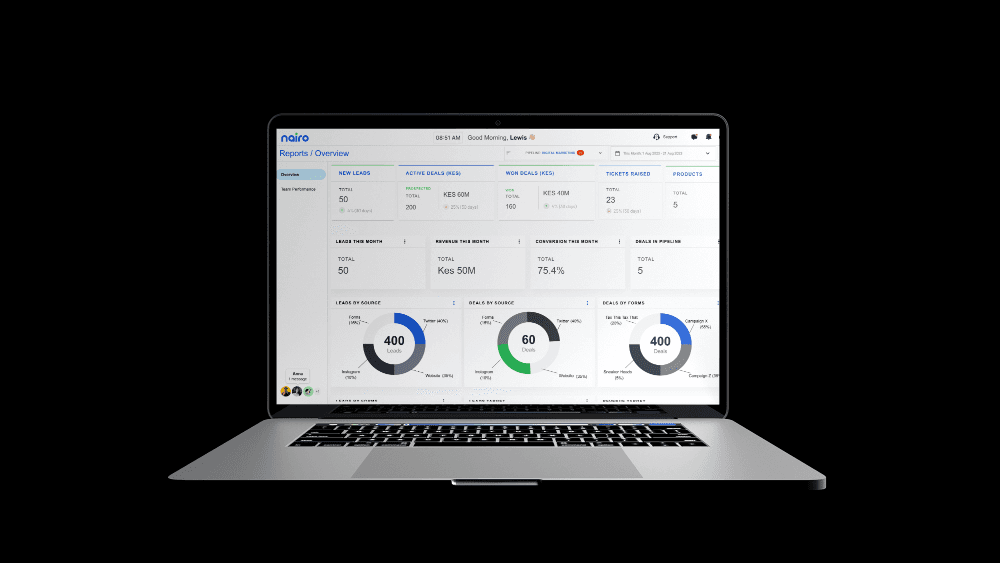
To understand the user needs, pain points, and preferences for the Nairo CRM system, which is designed to monitor sales, lead reports, marketing activities, and administrative functionalities.
1. Research Goals
Identify the primary needs and pain points of CRM users in relation to sales, lead management, marketing, and administration.
Understand user expectations and preferences for a CRM interface that combines these functionalities.
Evaluate current usability and user satisfaction with Nairo CRM’s features.
Discover opportunities for improving the CRM system’s user experience.
2. Target Audience
Sales Representatives: Users who need to track and manage sales pipelines and client interactions.
Marketing Professionals: Users focused on campaign management, customer segmentation, and tracking marketing activities.
Administrators: Users responsible for CRM settings, user management, and overall system administration.
Sales Managers and Team Leads: Users who monitor sales performance, analyze reports, and manage teams.
3. Research Methods
User Interviews
Purpose: Gather qualitative insights into user needs, behaviors, and pain points.
Participants: 10-15 participants, including sales representatives, marketing professionals, and administrators.
Format: Semi-structured interviews lasting 30-45 minutes.
Key Questions:
What are your primary tasks when using Nairo CRM?
What challenges do you face while using Nairo CRM for sales, marketing, or administration?
How do you currently track sales leads and manage customer relationships?
What features do you find most and least useful?
Usability Testing
Purpose: Evaluate how users interact with the CRM system and identify usability issues.
Participants: 8-10 participants with varied roles (sales, marketing, administration).
Format: Task-based usability tests conducted in a controlled environment or remotely.
Tasks:
Create and update a lead in the CRM.
Generate a sales report for a specific period.
Set up a new marketing campaign and monitor its progress.
Manage user roles and permissions within the admin dashboard.
Metrics: Task completion rate, time on task, error rate, and user satisfaction ratings.
Surveys and Questionnaires
Purpose: Collect quantitative data on user satisfaction, feature usage, and overall experience.
Participants: 50-100 participants, including all user roles.
Key Areas:
Frequency of use for different CRM features (sales tracking, lead management, marketing, admin functions).
Satisfaction levels with each feature and overall CRM experience.
Suggestions for feature improvements or new functionalities.
Contextual Inquiry
Purpose: Observe users in their natural environment to understand their workflow and CRM usage.
Participants: 5-7 users from different roles.
Format: 1-2 hour observation sessions, either in-person or remotely.
Focus Areas:
How users integrate CRM into their daily tasks.
Interactions between different roles (e.g., sales and marketing teams).
Workarounds or tools used alongside Nairo CRM.
Competitive Analysis
Purpose: Identify strengths and weaknesses of Nairo CRM compared to competitors.
Focus Areas: Feature comparison, usability, pricing, customer support, and user reviews.
Competitors: Salesforce, HubSpot, Zoho CRM, and Microsoft Dynamics 365.
4. Data Analysis and Synthesis
Affinity Mapping: Organize qualitative data from interviews and usability tests to identify common themes and pain points.
Statistical Analysis: Analyze survey results to determine user satisfaction trends and feature usage patterns.
Usability Findings: Compile usability test results to identify key areas for improvement in the CRM interface and workflows.
5. Key Deliverables
User Personas: Profiles representing key user groups, their needs, goals, and pain points.
Journey Maps: Visual representations of user workflows and interactions with Nairo CRM.
Usability Report: Detailed findings from usability tests, including task success rates, common errors, and user feedback.
Recommendations: Actionable suggestions for enhancing the user experience, addressing pain points, and adding new features.
Prototype or Wireframes: Visual designs showcasing suggested improvements to the CRM’s interface and workflows.
6. Timeline

Week 1-2: Plan research, recruit participants, and prepare materials.
Week 3-4: Conduct user interviews and contextual inquiries.
Week 5-6: Administer surveys and usability testing sessions.
Week 7-19: Analyze data and synthesize findings.
Week 20- 51: Develop deliverables (personas, journey maps, usability report).
Week 52: Present findings and recommendations to stakeholders.